






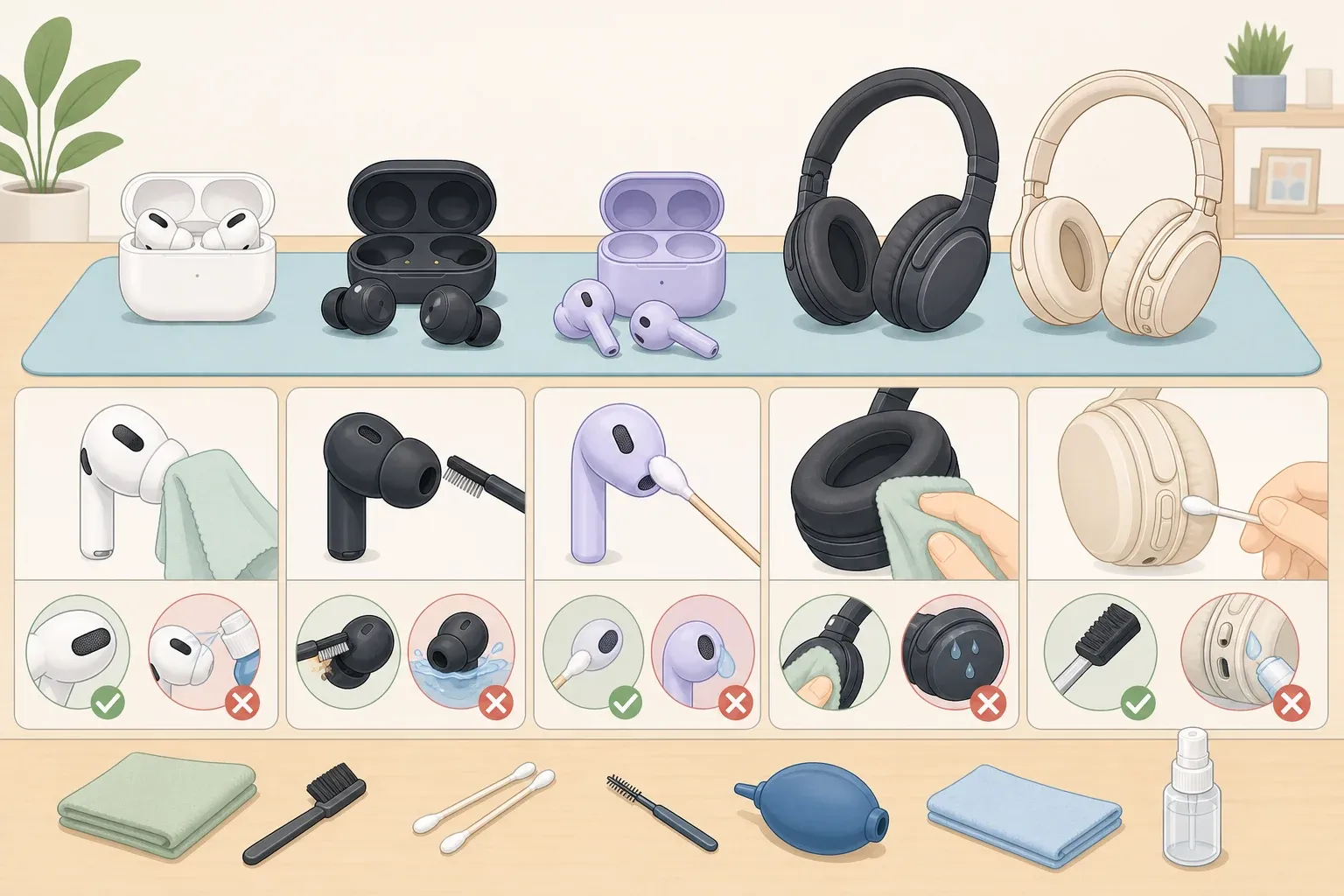
The safe way to clean headphones depends entirely on the model in your hand. Apple restricts AirPods mesh cleaning to specific marked zones and warns against touching anywhere else. Samsung tells Galaxy Buds4 owners never to use alcohol or acetone on their earbuds, and that same method would ruin an AirPods cleaning routine. Sonos, covering over-ear headphones, steers users toward plain soap and water instead. These aren't stylistic preferences. They reflect real differences in materials and engineering, so matching the method to the device is the whole job.
AirPods Pro 3 shows why the distinction matters. Apple built in a water-immersion step for the earbud body itself, something it explicitly prohibits for AirPods 3, 4, 5, and Pro 2. Use one model's method on the wrong device and the risk is damaged mesh or liquid somewhere Apple specifically warns against. This guide covers AirPods and AirPods Pro, Galaxy Buds4 and Buds4 Pro, over-ear and on-ear headphones, and a fallback route for everything else. Find your model below before touching a brush or cloth to anything.
What you'll need
Gather these before starting. Not every item applies to every device, but having everything on hand means no mid-cleaning scramble.
Soft-bristled children's toothbrush or soft cosmetic brush, per Apple Support and Samsung Support
Clean, dry, lint-free cloth (microfiber works well)
Small cup or bowl for water or cleaning solution
Distilled water for air-dried parts; tap water works in most homes, but distilled avoids mineral spotting
Mild, dye-free, fragrance-free dish soap, for over-ear headphones only, per Sonos
Micellar water containing PEG-6 Caprylic/Capric Glycerides, such as Bioderma or Neutrogena, for AirPods mesh only
Isopropyl alcohol, limited to specific hard case surfaces on specific devices, not a universal cleaner
Paper towels
This is beginner-friendly work. No disassembly is required beyond tips or cushions the manufacturer designed to be removable.
Before you start: find your cleaning path
Match your device to the right method below before you touch anything.
AirPods 3, 4, 5, or AirPods Pro 2: Use the Apple mesh-brushing method. Designated mesh zones only, no immersion.
AirPods Pro 3: Apple allows a water-rinse step for the earbud body, in addition to the mesh method. That's a documented exception for this specific model, not a general rule for every AirPods generation.
Galaxy Buds4 or Buds4 Pro: Use the Samsung method. Soft brush with water on ports, dry cloth wiping on sensors and charging contacts, no alcohol or solvents.
Over-ear or on-ear headphones: Use the shell-and-cushion method with mild soap and water, checking your manual before removing any pad.
Wired earbuds, neckband headphones, other brands, or anything with removable silicone or foam tips not covered above: Jump to "If your headphones aren't covered here" for a conservative, manual-first approach.
Two rules apply no matter which device you own. Don't vacuum microphones; the air pressure can damage them. And power off or unplug any wired or electrically connected headphones before cleaning, since water and electrical components don't mix even in small amounts, per the same Sonos guidance.
How to remove earwax from headphone mesh safely
Earwax and skin oil buildup in the mesh is probably what brought you here, and the fix depends on what's in your ears. For AirPods and AirPods Pro, that means brushing only the marked mesh zones with micellar or distilled water, since Apple is explicit that other areas shouldn't be touched. For Galaxy Buds4 or Buds4 Pro, Samsung's soft-brush port method handles the same job, with dry-cloth wiping reserved for the sensors and charging contacts.
If your earbuds aren't one of these, check the manual before brushing or wiping anything near the speaker mesh. Detachable tips and mesh coverings vary enough by brand that a method safe for one pair can damage another.
How to clean AirPods and AirPods Pro
Confirm which AirPods model you have before starting. The steps differ for AirPods 3, 4, 5, and Pro 2 versus the newer Pro 3.
Standard method, AirPods 3, 4, 5, and AirPods Pro 2:
Wipe the exterior with a dry, lint-free cloth first.
Identify the designated mesh zones. Apple marks specific encircled areas on these models as the only safe cleaning spots and warns against cleaning anywhere else.
Dip a soft-bristled children's toothbrush in micellar water or distilled water and brush the mesh in small circles for about 15 seconds, repeating three times total, per Apple Support. Skip anything sharp here, like a toothpick or pin; Apple warns that it can damage the microphone or speaker holes.
Let everything dry completely for at least two hours before returning the buds to the case.
Clear charging port debris with a dry, soft brush only. Apple says not to put anything else in the port, since that can damage the metal contacts.
Clean the charging case with a dry, lint-free cloth, dampening it slightly with isopropyl alcohol only if needed, according to Apple Support. Keep liquid away from the charging ports themselves.
Exception: AirPods Pro 3 only. These earbuds can be rinsed by immersing each one in a bowl of water for 10 seconds while shaking lightly, then dabbing dry on a lint-free cloth. This step applies to the Pro 3 body specifically; Apple does not clear AirPods 3, 4, 5, or Pro 2 for immersion. Removable ear tips on AirPods Pro models can also be pulled off and rinsed with water only, no soap, and need to dry completely before reattaching.
Check for no visible debris in the mesh or ports, an exterior that's dry to the touch, and normal charging after the two-hour drying window. If cleaning doesn't fix the problem, Apple recommends getting the AirPods serviced rather than running through the cleaning steps again.
How to clean Galaxy Buds4 and Buds4 Pro
This is a distinct procedure from the AirPods steps above, and Samsung says not to use alcohol, acetone, or other solvents at any point in it, since they can damage the device.
Dip a soft brush into a cup of water and gently brush each port for about 15 seconds, then wipe the moisture away with a paper towel. Repeat three times. Avoid excessive force or anything sharp here; Samsung warns that it can damage the air duct, speaker, or microphone holes.
Rinse the brush with distilled water, brush again, and wipe dry.
Use a soft, dry cloth to wipe dust from the sensors and touch "blades," avoiding rubbing the sensor surface itself, which can scratch it. Debris left on the blade can interfere with touch recognition.
Wipe charging contacts on both earbuds and inside the case with a dry cloth. If dust or debris is visible on the cradle contacts, cleaning is needed. Keep liquid away from these contacts; dry-cloth wiping is the only method Samsung recommends here.
Let the earbuds dry completely before use, removing all moisture after any water contact.
If the earbuds still won't charge properly after cleaning, Samsung recommends repeating the contact-cleaning steps before assuming anything else is wrong.
How to clean over-ear and on-ear headphones
Hard shells and cushions are different materials, so treat them differently, and check your manual before you remove anything.
Turn off and unplug the headphones first. Electricity and water, even the small amount used here, don't mix.
Check your manual before touching any ear cushion. Only detach pads the manufacturer designed to come off; do not remove a pad unless your manual confirms it's removable. Sonos Ace cushions use magnets specifically so they can be removed safely, but not every pair of headphones is built that way.
Mix a mild solution: about ¼ teaspoon of fragrance-free dish soap per 1 cup of water. A single pair of headphones shouldn't need more than that.
Wipe hard, non-porous surfaces like plastic and metal with a dry cloth first, then a cloth dampened, not soaked, with the solution for tougher smudges. The cloth should be damp enough to clean but not so wet that it leaves droplets behind.
For pads confirmed removable and made from memory foam and leather, like the Sonos Ace or any material your manufacturer approves for soap and water, clean with the same mild solution using lighter pressure, since cushion materials are generally softer than the hard shell. That's the core of how to clean headphone ear pads without damaging them. Suede, genuine leather, or unfamiliar fabric finishes may need a different cleaner, so check the manual rather than assume soap and water is safe.
Dry cushions separately before reattaching. Fabric absorbs water, and cushions need to be dry all the way through, not just on the surface, before they go anywhere near electrical components again.
Skip alcohol-based solvents entirely here. Sonos calls them unnecessary and says they risk ruining the headphone finish, a contrast to the limited alcohol use Apple permits on an AirPods case.
Cushions are typically the first part to wear out, since they're softer and take constant friction, according to Sonos. If a pad is cracked or flattened beyond cleaning, check whether the manufacturer sells replacement cushions instead of continuing to deep-clean worn foam.
If your headphones aren't covered here
Wired earbuds, neckband models, and other brands need a manual check before anything else. Manufacturer instructions vary by tip and cushion material; Sonos tells in-ear bud owners specifically to check their own device manual before cleaning, since detachable silicone or foam pieces may allow things over-ear models don't.
Until you've confirmed your model's instructions, a safe baseline holds for how to clean earbuds of any brand: dry, lint-free cloth on exterior surfaces, no submersion, no alcohol unless the manual says it's approved for that surface, and a soft brush used gently on visible port debris so lint doesn't get pushed deeper. If you can't find a manual, the manufacturer's support site is the next step before trying any solvent or immersion method.
How often to clean
Wipe exteriors daily with a dry, lint-free cloth. That habit alone prevents most buildup, according to Sonos. Clean promptly after workouts or exposure to sweat, sunscreen, makeup, or lotion; Apple flags those as substances that can cause skin irritation and, left on too long, staining or other damage to the earbuds themselves.
As a practical rule of thumb, save the full mesh-brushing, port-cleaning, or cushion-washing routine for whenever debris is actually visible, which for most regular users lands around once a week.
Finish line: what success looks like
Before you call the job done, mesh, ports, and charging contacts should show no visible debris, and earbuds need to sit dry for at least two hours before they go back in the case, since both Apple and Samsung warn that reinserting damp buds traps moisture against the contacts. Ear pads and headbands should feel dry throughout, not just on the surface, before reattachment.
If charging, touch controls, or sound quality are still off after a full cleaning and drying cycle, that's the point to contact manufacturer support rather than try a second round of DIY cleaning or reach for a stronger solvent. Use only the cleaner your manufacturer approves for that specific surface, and check the manual anytime a step isn't covered here.



Comments
Be the first, drop a comment!