



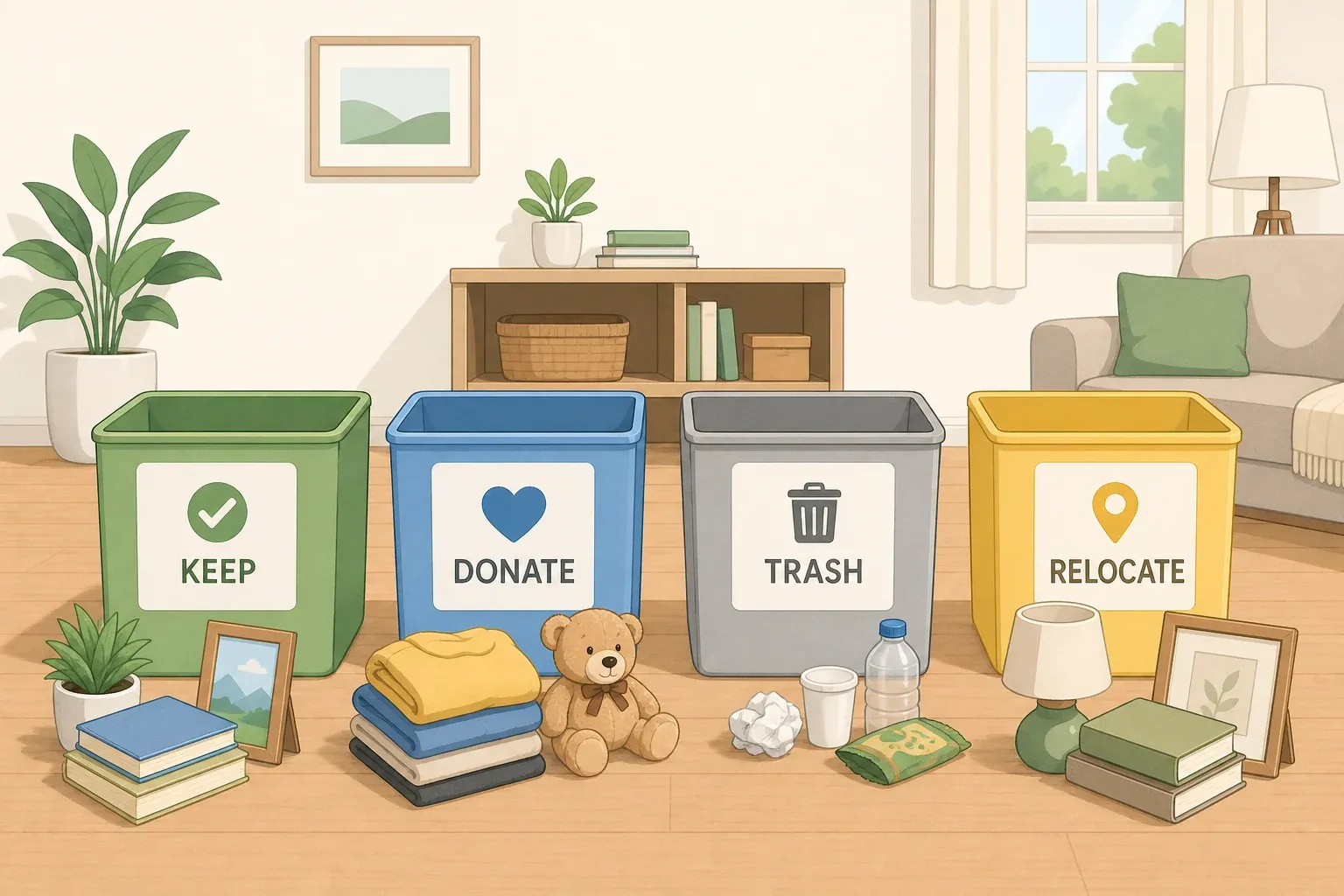
The four-box decluttering method sorts every item in a room into one of four labeled containers: Keep, Donate, Trash, or Relocate. Nothing gets set aside "for now." Clutterless Nest describes it as giving each item "a decision and a handoff in the same motion." There's no fifth box for maybe, no pile you'll deal with later. Every item gets a destination before it leaves your hand, and every category gets a clear next action the same day you sort.
Not everyone needs all four boxes, though. Julie, a professional organizer interviewed by Homes & Gardens, recommends dropping the Relocate category for anyone who tends to get overwhelmed or distracted mid-project, since a fourth option "can often snowball into a big, undefined pile that creates more decisions later." This guide covers both versions: how to decide which fits you, how to define and set up the categories, and how to close out a sorting session so items actually leave the house instead of shifting to a new corner of it.
Choosing three boxes or four before you start
Make this call before you gather containers, since it changes what you set up. For this guide, use four boxes only when every out-of-room item you're likely to find already has a known spot you can deliver it to the same day. If you can't say that with confidence, lean toward three boxes instead.
Devon Fegman-Herdman, a professional organizer quoted by Homes & Gardens, says she prefers the three-box system "because as you add categories, the decision-making can become overwhelming." Her fix is to let out-of-place items collect in one small, contained pile during the sort, then spend a focused 15 minutes at the end moving everything to its rightful room. That single wrap-up step, done once instead of stopping mid-sort to deliver items, is what keeps momentum going.
The three-box version sorts everything into Keep, Donate or Sell, and Trash, with relocation handled separately at the close. If you add "Sell" to your Donate box, treat that as your own rule, not part of the sourced method: give the item a firm listing deadline, and if it hasn't sold by then, let it drop back into the donate load. Without that fallback, "maybe I'll sell it" turns into exactly the open-ended holding pile this whole method is built to avoid.
Keep, Donate, Trash, Relocate: what goes in each box
Keep is for items that belong in the exact room you're sorting and earn their spot there. Donate is for working items someone else could use, and the rule is that they leave the house, not just the pile. Trash is for anything broken, expired, or genuinely unusable. Relocate, sometimes called Storage, is for items that belong in a different room or are seasonal, but only if they already have a real place to go. From here on, this guide sticks with "Relocate" for consistency.
That last condition is the one people skip. Relocate only works when the item has a labeled destination and a review date attached: a particular drawer, shelf, or bin, not a vague idea of "the garage." Skip either part and the source warns Relocate "quietly becomes a second pile in a new corner." If something is needed but doesn't have an actual home yet, don't shove it in Relocate as a placeholder. Either carve out a spot for it during this session, or handle it separately at the end.
A handful of items don't belong in a regular Trash bag even though they're clearly not being kept. Batteries, electronics, paint, and cleaning chemicals, along with expired medication and documents that carry account or medical details, need a different path than the trash bag or the donate box. Set these aside in a small separate pile while you sort, and check your local waste program's rules for drop-off or disposal before you close out the session. That way you're not stuck holding a paint can with nowhere to put it once everything else is done.
Set up the four-box decluttering method
You don't need matching bins. A laundry basket works for Keep, a canvas tote or paper grocery bag works for Donate, an open trash bag propped in a corner handles Trash, and a second basket or bag covers Relocate. That's the full supply list. Masking tape and a marker make fine labels. "Box" is used loosely across organizing advice and can mean a bag, a basket, or just a clearly marked patch of floor.
This is a beginner-friendly sorting task, not a construction project. It requires no tools beyond containers and labels, and there's no skill threshold to clear before starting.
Set your containers up inside the room itself, not staged in the hallway where you'd have to carry things back and forth. Keep the Donate and Trash containers open and within arm's reach, since those are the two people instinctively avoid. If you can, put the Keep basket close to where those items will actually end up living.
Give yourself a realistic window. A bedroom or full closet typically runs three to four hours. A kitchen runs six to eight hours and works better split across two sessions than crammed into one marathon day. A garage is realistically a full weekend, since physical fatigue piles on top of decision fatigue out there. Add time if you're working through drawers of paperwork, sentimental boxes, or a space you haven't touched in years.
Step-by-step: How to declutter with four boxes
Start in one corner and work in a single direction around the room. Handle floors and open surfaces first, and save drawers and closed containers for a second pass once you're warmed up but not worn down. After this first lap, floors and open surfaces should look visibly clear, even with drawers still waiting.
Pick up one item and assign it immediately. Obvious trash, like broken, expired, or unusable, goes straight in without debate. Don't set it down to think about it.
Carve out a small, strictly limited exception pile for financial documents, IDs, valuables, or sentimental items that need real thought. Cap it at one small box, and give yourself a firm same-day deadline to run it through Keep, Donate, Trash, or Relocate. This is a practical limit worth setting for yourself, not a research-backed rule, but it keeps a legitimate exception from turning into an open-ended maybe pile.
Use a quick test for anything else that slows you down. If you're stuck, ask "would I buy this again today?" instead of "should I keep this." The same source notes that hesitation past about 20 seconds often signals uncertain attachment, worth treating as a nudge to keep moving rather than a hard rule, especially for anything more complicated than ordinary household clutter.
Watch for decision fatigue tipping into shutdown. Freezing on every item is a cue to end the session, not push through it. Stop around the three-hour mark as a general guideline, since a shorter session beats forcing more decisions than you have left in you.
Give every box its next action the same day. Trash goes out to the bin. Donations leave the house, whether that's the car trunk, a drop-off, or a scheduled porch pickup. Put Keep items away in their actual spots. Give Relocate its label and destination, even if the physical move happens shortly after. If you ran the three-box version, this is where Devon Fegman-Herdman's 15-minute wrap-up comes in. Sorting was never the finish line. Getting items out of their old spots is.
Troubleshooting mid-sort problems
If Relocate keeps growing past a small pile, stop feeding it. Switch those items into the exception pile instead and handle them at the end, the way the three-box version does. An overflowing Relocate box mid-session is a sign to change tactics for the rest of the room, not to push through with a bigger box.
If you're genuinely unsure about a box, whether it's headed to Relocate or sitting in Keep, give it a review date about six months out. If you haven't needed anything from that box by then, you can donate the whole thing without opening it back up.
If a kitchen or garage session is running long past the estimate, that's decision fatigue stacking with sheer volume, not a sign you're doing it wrong. Split the space into a second session instead of forcing a finish.
If hazardous or sensitive items turn up mid-sort — an old paint can, expired pills, a dead hard drive, don't let them stall momentum on ordinary clutter. Set them in the separate pile mentioned earlier and keep moving. Handle their disposal once the main sort is done.
Finish the sort, then keep it from creeping back
A completed sort is a reset, not a permanent system. Clutter tends to rebuild to its old baseline within three to six months if nothing changes about what keeps flowing into the room, a pattern organizers call clutter creep. Two low-effort habits help the reset hold longer: keep a standing donation bag going in the closet year-round instead of waiting for the next big purge, and apply a one-in-one-out rule so volume stays flat instead of quietly climbing.
Check your work around the 90-day mark. Walk the room and ask one question: are the surfaces covered again? If they are, that's not a failure of the method, it's a signal to adjust. Shorten future sessions, switch from four boxes to three if Relocate keeps reappearing as its own pile, or consider bringing in a professional organizer if hesitation and indecision, rather than the categories themselves, keep tripping you up.
Before you call the session done, run through this:
Trash is disposed of, with batteries, electronics, paint, cleaners, medications, and sensitive documents set aside for the right drop-off or shredder
Donations are in the car, dropped off, or scheduled for pickup, not stacked by the door
Keep items are put away in their real spots
Relocate items have a label and a destination, delivered now or shortly after
A rough date is set to walk the room again, around 90 days out
Don't overthink the exact hour counts or the 20-second rule used here. They're planning guides from one organizer's experience, not universal law. What matters is finishing the loop: every ordinary item gets a category, and every category gets a clear next action before you stop.







Comments
Be the first, drop a comment!