



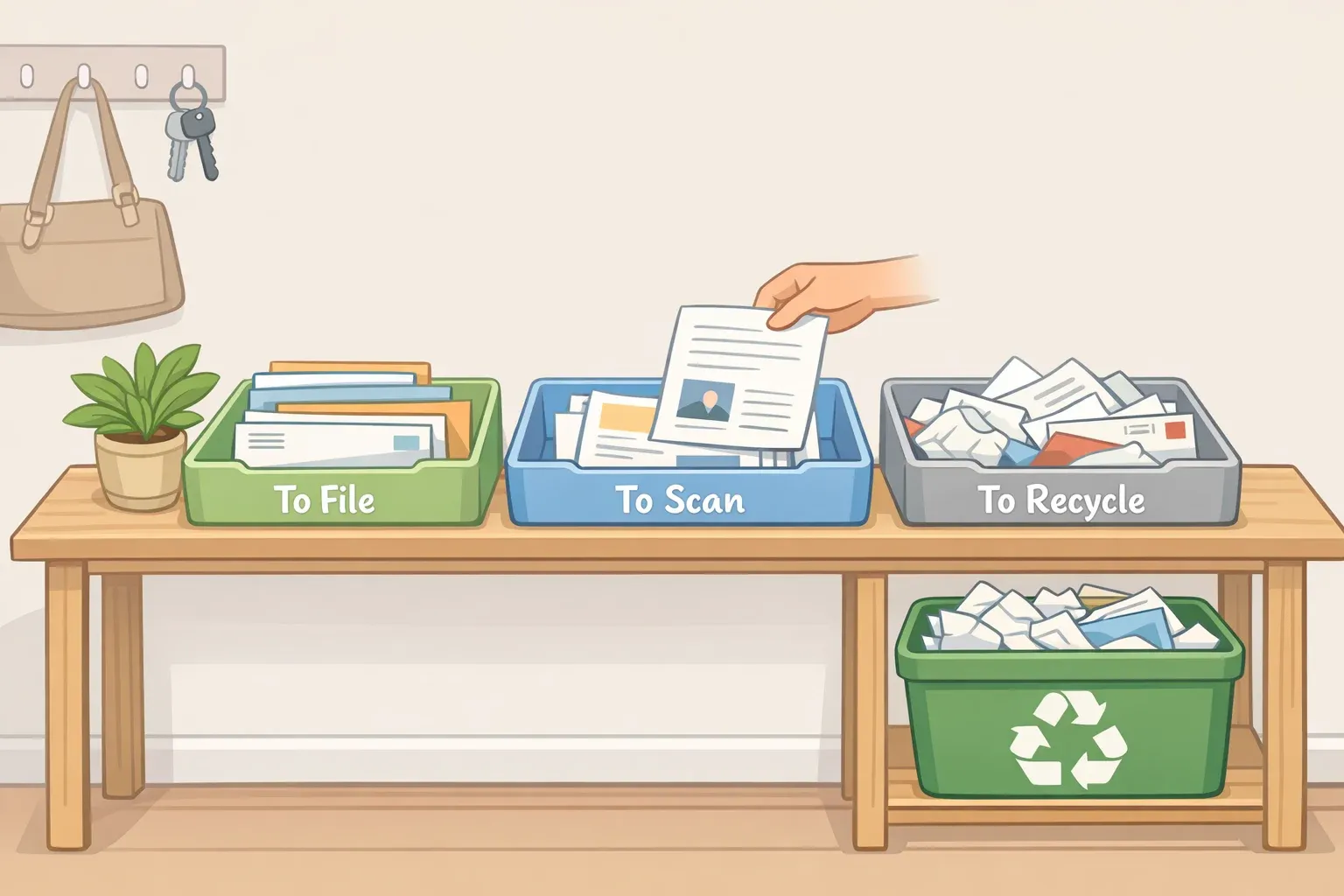
Every piece of paper that lands on a kitchen counter is an unanswered question. Pay it, sign it, file it, scan it, or toss it. The pile doesn't grow because there isn't enough storage. It grows because those questions keep getting deferred. The real problem is delayed decisions.
The scale of the problem is worth acknowledging. The USPS delivered roughly 108.7 billion pieces of mail to 170.4 million delivery addresses in fiscal 2025, which works out to one or two pieces per household per day. That's before school forms, receipts, medical paperwork, and printed confirmations. The average home doesn't have a shortage of paper storage. It has a shortage of a system for deciding what to do with paper the moment it arrives.
This guide walks through building a four-zone paper drop system to help you organize paper clutter at home before it ever reaches a flat surface. It also covers the minimum you need to know about what survives triage and where it goes next.
Before you start, gather four containers:
One tray or wall pocket (Action)
One folder or box (File)
One small envelope or pouch (Scan)
One recycling basket (Recycle)
Optional: a scanner app on your phone.
Why a filing cabinet doesn't solve what happens at the door
Nearly every conventional home paper guide follows the same script: buy hanging folders, assign a dozen categories, label them, file each document correctly. That addresses exactly one thing, retrieval, and does nothing about the moment mail walks in the door.
A home filing system has a narrow job. Granite defines it precisely: when you need a specific document, you should be able to find it in under a minute. That's a back-end function. It assumes the paper has already been sorted, decided on, and routed somewhere useful. It has nothing to say about the bill sitting on the counter for the third week in a row.
A single-tray inbox makes the same mistake in miniature. A standard inbox tells paper where to sit; a command center tells the person holding it what kind of decision the paper needs. The first delays the question. The second answers it on arrival.
These are two different layers of the same problem. The drop zone handles the front end. The filing cabinet handles the back end. Get the front end right and the back end almost manages itself.
How to sort paper clutter before it becomes a pile
The decision doesn't have to be complicated. Four questions, applied in sequence, route any paper correctly:
Needs action this week? Action tray.
Must keep the original? File.
Can keep it digitally? Scan.
No realistic future use? Recycle.
That rubric handles most of what walks through the door. The sections below turn it into a physical setup.
Step 1: Choose the location and commit to it
Place the system exactly where paper arrives. Put it where mail and school papers naturally land, whether that's the entryway, kitchen counter, or a hallway shelf, not tucked away in a spare room you pass once a week. If the system isn't on the path paper travels, paper won't reach it. Visibility is the whole mechanism.
Step 2: Label the four zones
Four zones that cover everything a household generates:
Action
What goes here: Bills due, forms to sign, invitations, returns, appointments
Empty how often: Weekly
File
What goes here: Documents that must be kept in physical form (tax records, insurance policies, contracts)
Empty how often: Monthly (moved to the filing cabinet)
Scan
What goes here: Receipts, manuals, school notes, records you can digitize
Empty how often: Weekly or monthly
Recycle
What goes here: Envelopes, ads, expired flyers, duplicates
Empty how often: Daily or every two days
The File zone is a staging area, not permanent storage. Tax records, legal documents, insurance policies, medical records: those belong here. Anything you'll only need temporarily, or anything a scan would fully replace, goes to Scan instead. A practical rule of thumb: if you might need to produce the original document, File it. If a scan would serve just as well, Scan it.
Step 3: Sort every incoming paper immediately
When paper enters the home, it goes into a zone before it touches a flat surface. Not "I'll deal with this in a second." One of four places, right now. The pile forms at the moment of deferral. Cut the deferral and you cut the pile.
The most common mistake is setting a paper down "just for now" while deciding where it belongs. That is precisely how clutter starts. When genuinely uncertain, drop it in Action. You'll resolve it at the weekly review.
Three examples of how this plays out in practice:
Junk mail catalog: Recycle. No decision needed. Goes straight to the basket before you've set down your bag.
Electricity bill: Action. Needs payment this week. Into the tray now, handled at Sunday's review.
School permission slip: Action, into the child's labeled sub-folder if applicable. Deadline transferred to the family calendar at the weekly review.
Step 4: Set a fixed weekly review time
BetterHomeHabits recommends treating the weekly 15-minute paper review like a home admin appointment: same time, same day, non-negotiable. The sequence: open Action, pay or sign or reply or delegate each item, move completed papers to File, Scan, or Recycle, transfer any dates to the family calendar, clear the surface around the system.
A tray without a review date becomes a nicer pile. No review day, no system. The weekly appointment is what makes this a system instead of a container.
For families, add one labeled sub-folder per child inside the Action zone to keep school papers from mixing with household documents. Artwork and sentimental papers go into a separate memory box, culled to favorites at the end of each month rather than accumulated indefinitely.
Step 5: Empty File and Scan zones monthly
The drop zone is a staging area. A system that fills up becomes invisible: people stop trusting it and start making new piles elsewhere. Once a month, move everything in File to the actual filing cabinet and process everything in Scan. The command center should always feel light enough to use again tomorrow.
What deserves a file, and what doesn't
The drop zone handles intake. The filing cabinet handles retrieval. Here's what you need to know about the second layer to make the first layer work.
Granite identifies subject or categorical filing, documents grouped by topic rather than alphabetically or by date, as the natural fit for a household. A workable home paper organization system might use six broad categories: Taxes, House, Vehicles, Medical, Insurance, and Identity/Legal. Inside each category, keep the newest documents on top. That's the structure.
Retention guidance (general reference; consult a professional for your specific situation):
Routine purchase receipts only need to survive the return or warranty window, per Granite. At month's end, scan tax or warranty receipts and discard routine ones.
Most tax records: keep at least three years, the IRS's general window to assess additional tax after filing. That window may extend to six years if income may have been underreported by more than 25%, and to seven years for claims involving worthless securities or bad debt, per Granite.
Vital records, including birth and marriage certificates, Social Security cards, passports, property deeds, vehicle titles, and wills, are permanent. Granite recommends storing them in a fireproof, waterproof container at home or a safe deposit box, with one specific exception: never keep the only copy of a will in a safe deposit box, since the box can be sealed at death.
On scanning: scan only papers with a future purpose. Scanning everything to avoid deciding is digital clutter with extra steps. One exception worth knowing: thermal-paper receipts can fade significantly within five years even under ideal storage conditions, so scan those promptly if you need them long-term. When naming scanned files, use a clear convention: year, topic, person. "2026-school-trip-permission" is findable. "IMG_4842" is not, per BetterHomeHabits.
The maybe file: Uncertainty is one of the main reasons papers drift around a home. BetterHomeHabits suggests a labeled "maybe" folder with a three-month review date written on the front. Papers that don't clearly belong anywhere else go in there, contained and dated rather than scattered. After three months, review the folder and recycle most of it. It gives indecision a physical home and a built-in expiration.
When the system gets disrupted
Three common situations, and how to handle each:
Paper arrives when hands are full: The rule holds. Set the bag down, then sort. The system requires one extra motion, not a reorganized routine.
One person in the household ignores the system: A drop zone only works if everyone using the space knows where it is and what the four labels mean. One brief walkthrough is enough. The system's visibility handles the rest.
The Action tray overflows: This signals a missed weekly review, not a broken system. An overflowing Action tray is still better than an undifferentiated pile because every paper in it has already been identified as needing action. Work through it at the next session and reset the weekly appointment.
One afternoon to build it, fifteen minutes a week to keep it
Granite puts the time investment plainly: one afternoon is enough to stand the system up; a consistent weekly habit keeps it standing. You don't need a free weekend. Waiting for one is exactly how piles survive for years.
Once the home paper organization system runs smoothly for a month, consider reducing incoming volume at the source: email statements, online bill pay, school communication apps. The four zones handle whatever arrives. Fewer papers entering means less triage required, and that's the most efficient move of all.





Comments
Be the first, drop a comment!